“Write for humans, not search engines” is good advice, but writing for humans is also only half the advice.
If you’ve ever opened a blog post or article that repeats the same phrase, spends several paragraphs introducing a question, then takes far too long to answer it, you’ll understand the frustration behind that advice. If it’s a webpage, you probably didn’t bother to scroll very far either …
But the advice still leaves something out. Writing for a reader includes making the information easy to find and follow. Clear titles, focused sections, and useful links help people navigate the content. They also give search engines information about what a page covers and how it connects to other pages.
But the advice still leaves something out: Writing for a reader includes making the information easy to find and follow. That takes structure, and much of that work also helps search engines understand what a page covers and whether to rank it or cite it in, e.g. AI overviews.
That said, structure alone won’t get a page to rank. Search visibility also depends on factors beyond the writing, including whether search engines can access the page. But within the article itself, there’s plenty of overlap between helping a reader and making the topic clear.
So, when writing for humans, structure is part of the job from the start. This is how I do it.
When writing for humans, start with what they need to do
Before I start an outline, I want to know what someone needs from the page. “Phishing emails” gives me a topic. “Help someone work out whether an email is suspicious and what to do next” gives me a purpose to write toward.
That purpose changes what belongs in the article. The reader needs to know which warning signs to look for, how to check a message, and what they can do if they’ve already responded. They probably don’t need a history of email fraud before they can deal with the message sitting in their inbox.
Search queries are one way to help you spot those needs. Compare the questions people search for with the ones that come up in client conversations or feedback on drafts. You’ll have a better basis for your outline than a list of related keywords alone. For this you can start with free options like Google’s “People Also Ask” and auto complete in the search bar.
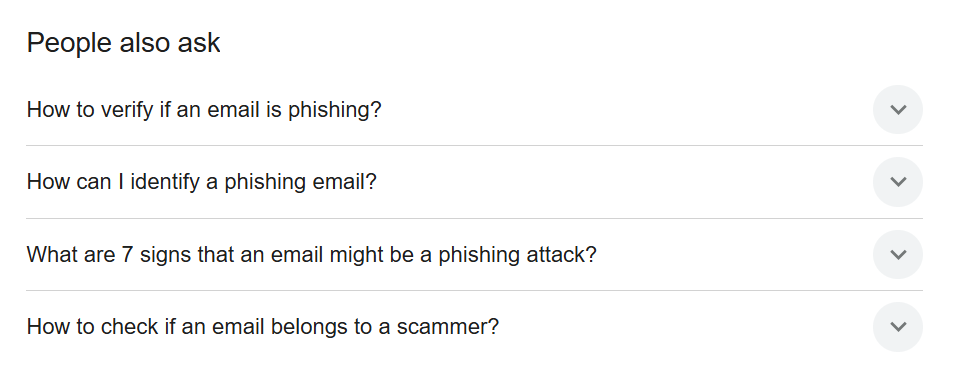
Now, you still need to decide who the page is for and what they already know. In legal writing, a lawyer researching an employment clause and an employee reading it in their own contract might use similar search terms. The lawyer may need case analysis, while the employee first needs to understand what the wording asks of them.
Google makes room for both the reader and search in its guidance on helpful content. It explains that search engine optimisation (SEO) can help search engines find and understand content, and that this work can support content written for people.
Write headings that tell readers what they can find
Once the purpose is clear, the headings should show how the article will deliver on it.
A heading such as “Staying safe online” could introduce almost anything. “How to check whether an email is phishing” tells the reader what the section will help them do. For our phishing article example, an outline might cover:
- Signs an email could be a phishing attempt
- How to check whether a message is genuine
- How to report a suspicious email
- What to do if you’ve clicked a link or shared information
There’s a reason for that order. The reader learns what should make them pause, how to investigate the message, and where to report it. Someone who’s already responded has a clear place to find the next steps.
The headings also make the page easier to use if someone arrives with a narrower question. A reader looking for a reporting process shouldn’t have to work through several sections to find it.
The article’s main heading also matters before someone reaches the page. Google can use it when creating the clickable title shown in search results. “How to recognise and report a phishing email” gives Google descriptive wording to draw on and helps someone decide whether the page answers their question before they open it.
Then check the text underneath. If “How to report a suspicious email” mostly explains why phishing is a problem, the section hasn’t answered its own heading. Move that material, change the heading, or write the instructions the reader came for.
Give the answer before the background
Clear headings help readers find the right section. The opening sentences should then help them get what they need.
If the page promises to explain how to recognise a phishing email, don’t spend the introduction explaining how much we rely on email. The person staring at a suspicious payment request is probably quite familiar with it. You could start with something like this:
Look for unexpected requests for account details, unfamiliar invoices, or messages claiming there’s a problem with your payment. A familiar company name or logo doesn’t prove an email is genuine, so check suspicious requests through contact details you already trust.
Now the reader has something to work with. You can build on that answer with examples of suspicious messages and explain how to check them.
An early answer also helps someone decide how much more they need to read. A reader who gets a quick answer and leaves may have had exactly the visit they needed. A personal essay or reported story may need a different opening. For an article that promises practical guidance, though, I want the introduction to start delivering that guidance.
Add the detail someone needs to act on the advice
An early answer gives the reader a starting point. The rest of the article should help them apply it.
“Verify the sender” sounds useful until someone tries to do it. Should they reply to the email, inspect the address, or call the number in the signature? The instruction leaves them to figure out how themselves. A concrete example makes the step easier to follow:
If an email claiming to be from your bank asks you to update your payment details, call the number on your bank card to check the request. Don’t use the contact details supplied in the suspicious message. This gives the reader a way to check the request without relying on information supplied by the sender/phisher.
Use the same check elsewhere in the draft. If you recommend a step, explain how to take it. If the right choice depends on a condition, tell the reader what that condition is. “Report the email” still leaves a gap if you haven’t explained where to report it or whether the instructions apply to a personal or work account.
This is where legal and compliance writing needs particular care too. If a process depends on the reader’s jurisdiction or their organisation’s role, include that information before they start following the steps.
Check factual claims against their original sources, and bring in a specialist when a point needs knowledge you can’t establish from the available evidence.
Follow-up questions deserve space when they help someone complete the task. For our phishing article, “What if I’ve already entered my password?” could be useful. A detailed comparison of business email security platforms would take the reader into a different job.
Google also looks beyond a page’s overall topic. Its passage ranking system examines individual sections to help assess the page’s relevance to a search. That suggests a useful answer to the password question could help Google recognise the article’s relevance to someone searching for that specific problem.
You can link to a separate article when a related subject needs its own explanation. You don’t have to fit it all onto this page. The wording of that link helps too. A link to the differences between SEO, AEO, and GEO tells readers what they’ll find next. Google uses link text as context about the linked page, and links between your own articles also help it find those pages. That’s a practical example of the reader’s next step and search visibility overlapping.
Google also says it doesn’t have a preferred word count. I use the reader’s task to judge how much detail a piece needs. A longer draft earns its space when it answers something the shorter version leaves unresolved.
Use precise language without forcing keywords
Once you’ve worked out what to cover, the wording should make those ideas easy to understand.
That includes using the terms your reader recognises. If you’re explaining phishing emails, call them phishing emails. Cycling through “fraudulent digital communications” and “deceptive electronic correspondence” gives the reader more wording to untangle.
A phrase such as “how to recognise a phishing email” may fit naturally into a heading. Working it into several consecutive sentences won’t make the answer more useful.
Google’s SEO Starter Guide explains that its language matching systems can connect a page with relevant searches even when the page doesn’t contain each exact phrase. You don’t need to make a sentence awkward to accommodate every variation.
Plain language helps with the rest. In a compliance article, compare “Conduct a review of the organisation’s data retention periods” with “Check how long your organisation keeps different types of data.” The second sentence makes the task easier to picture.
Keep a technical or legal term when it carries a meaning the simpler wording would lose, and explain it when your reader needs that help. Changing “must” to “should” can change how someone understands an obligation. Removing a qualification can make a security claim broader than the evidence supports.
Sometimes a few extra words make the explanation more accurate.
Check what each section adds before you publish
I check the outline early, then come back to it once the draft exists. Articles can wander while you’re writing, and a section that made sense in the plan may no longer add anything. One useful check is to write a short note beside each section explaining what the reader gets from it. If two notes say essentially the same thing, look at whether you need both sections.
In our phishing article, “Common signs of phishing” and “How to spot a suspicious email” could easily become two versions of the same list. Different headings won’t give the reader anything new if the paragraphs underneath make the same points.
You might combine them, move an example into the earlier section, or cut a paragraph that repeats something you’ve already explained. A brief reference back can help someone follow the argument. Explaining the same idea again at length usually gives them more reading without more information.
Before the final sentence edit, I also check:
- Does the title still describe the article I’ve actually written?
- Does a later step rely on something I haven’t explained yet?
- Have I made clear who the guidance applies to, including any relevant jurisdiction or circumstances?
- Do the sources support the precise claims I’m making, including any limits?
- Has an edit made for search made a sentence less natural or less accurate?
Then I read the piece aloud. It helps me hear repeated wording and sentences that sound fine on the screen but take too much effort to follow.
Where an SEO suggestion makes the page harder to read, I change it. The page still has to serve the person who opened it, whether they arrived through Google, a newsletter, or a link from a colleague. I can write a perfectly natural paragraph and still bury the point. If someone has to hunt across sections to work out what I’m recommending, the draft needs another edit.
Need help with content strategy, writing, or editing?
I help B2B, technology, cybersecurity, privacy, and legal teams plan, write, and improve content.
Email me